

The Python logging module provides three primary methods for configuring your logs. But what is a log configuration anyway?
The log configuration tells Python’s logger the following:
Where you want the log to go (the handlers)
How you want to format the log messages (the formatters)
What level of log you want (DEBUG, INFO, CRITICAL, etc)
and sometimes a bit more
In this tutorial, you will learn about the three different methods for configuring your logs in Python.
Here is a quick preview:
Configuring using
loggingAPIConfiguring using
fileConfigConfiguring using
dictConfig
These different configuration methods give you a lot of flexibility. Use the one that makes the most sense and makes your logging easier. Your choice depends on your experience and the type of project you are working on.
Get the Python Logging Book Today!
Don’t worry if you don’t pick the right method the first time. It’s normal to make mistakes and correct them when learning something new. In this case, there isn’t a “right” answer anyway, as this is all about making your code easier for you or your team.
Let’s get started!
Configuring Using the logging API
Configuring your logs with code uses Python’s logging methods and attributes.
You should review the following two configuration options because they use much of the same terminology as using the logging module directly. If you understand how to do it by hand in code, the other two methods will be easier to pick up, too.
Open up your favorite editor and create a new file called code_config.py. Then enter the following code:
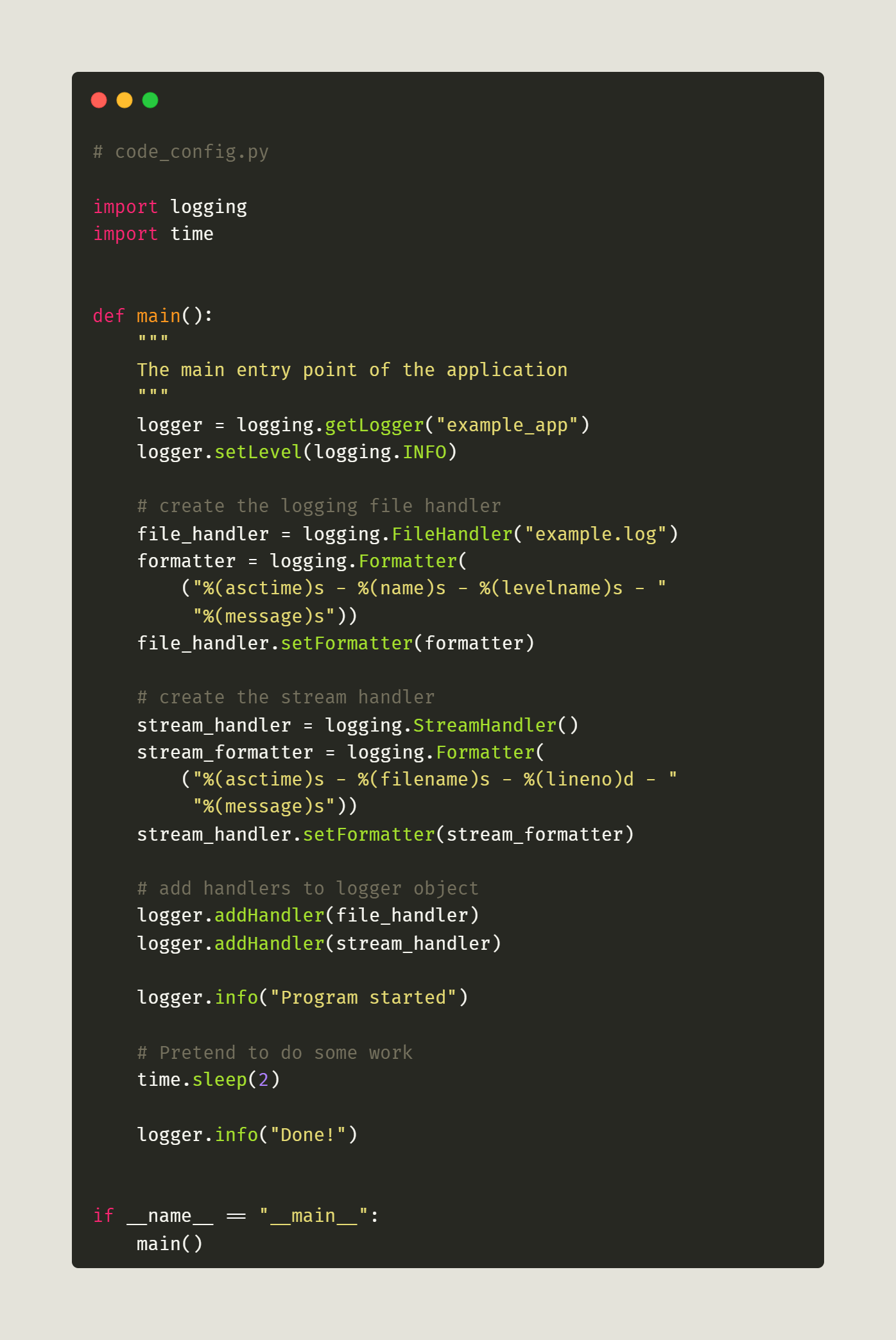
This example is similar to some of the others in this book. The primary difference is that you put all the logger configuration code into a function called main().
In production-ready code, you would probably put your logging code into its module and perhaps in a function called create_logger() or get_logger(). But no matter what you call it, you want to make the code more reusable.
Take a look at the example above. Here you have a logger with the following characteristics:
Name:
example_appLogging level: INFO
Two handlers: file and stream
Two separate formatters, one per handler
The last couple of lines exercise your logger and include a call to time.sleep() to emulate your application executing a long-running process.
When you run this code, you should see something similar to the following output to your console:
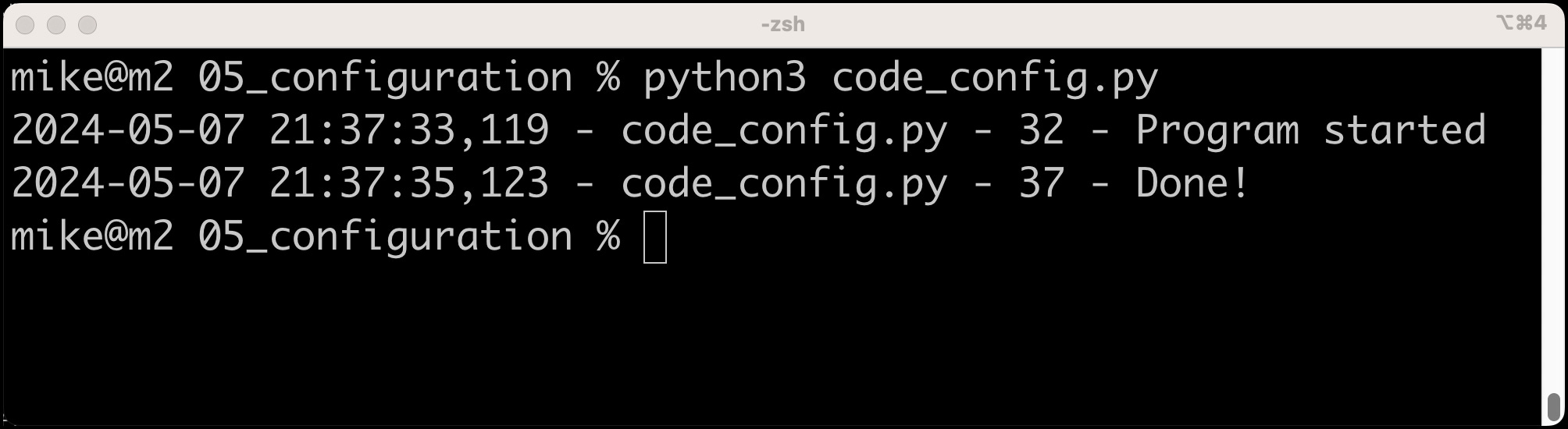
Your log file will look slightly different:
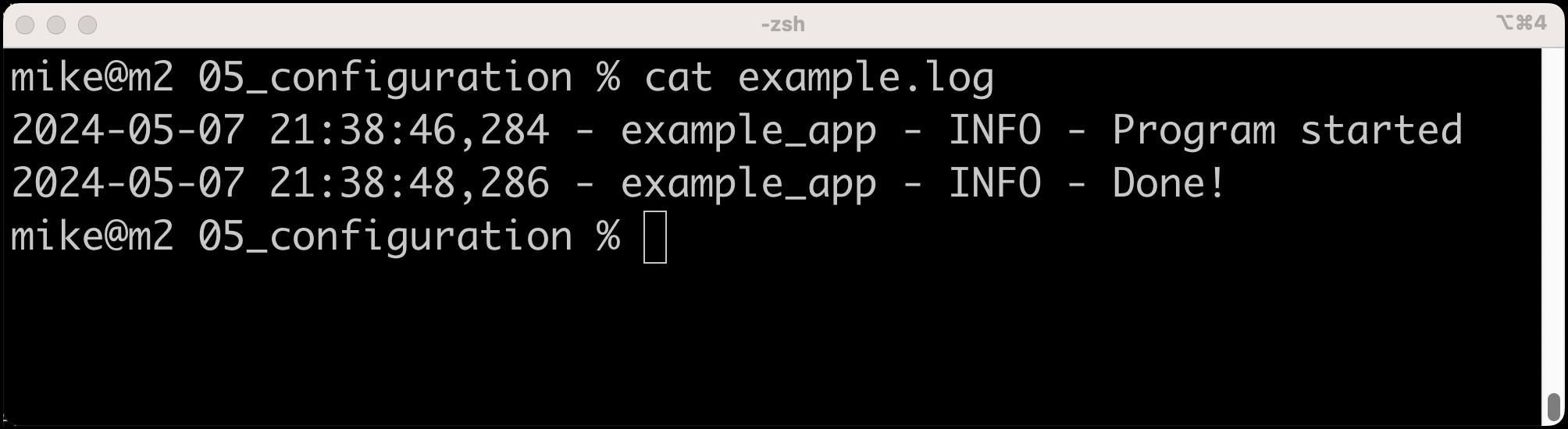
This is because you are using separate formatters for your two handlers.
Now that you have reviewed how to configure your logs using code, you can learn how to configure using a file!
Configuring Using fileConfig()
Your mission is to recreate the configuration you did with the code in this tutorial using a file configuration. But how does that work anyway? The configuration file for Python’s logging module is quite similar to a Windows INI configuration file. The file format that fileConfig supports comes from Python’s configparser module, which itself follows a format similar to Microsoft Windows INI files.
You create a section in the configuration like this: [loggers]. The square brackets mark the beginning and end of the section name. The text inside the square braces is the section name.
After creating a section, you can add a series of key-value pairs, with the key on the left, separated by an equals sign, and the value on the right. Here’s an example: level=CRITICAL. Each key/value pair is on a separate line.
The sections’ names are important, but you’ll need to look at an example to see why. Go ahead and open your favorite text editor or IDE and create a new file named logging.conf. The file extension doesn’t really matter, but .conf is a good choice as it indicates that you are creating a config file. You could also use .ini, as that is a very common configuration file extension, too.
Now that you have the file created, enter the following text into it:
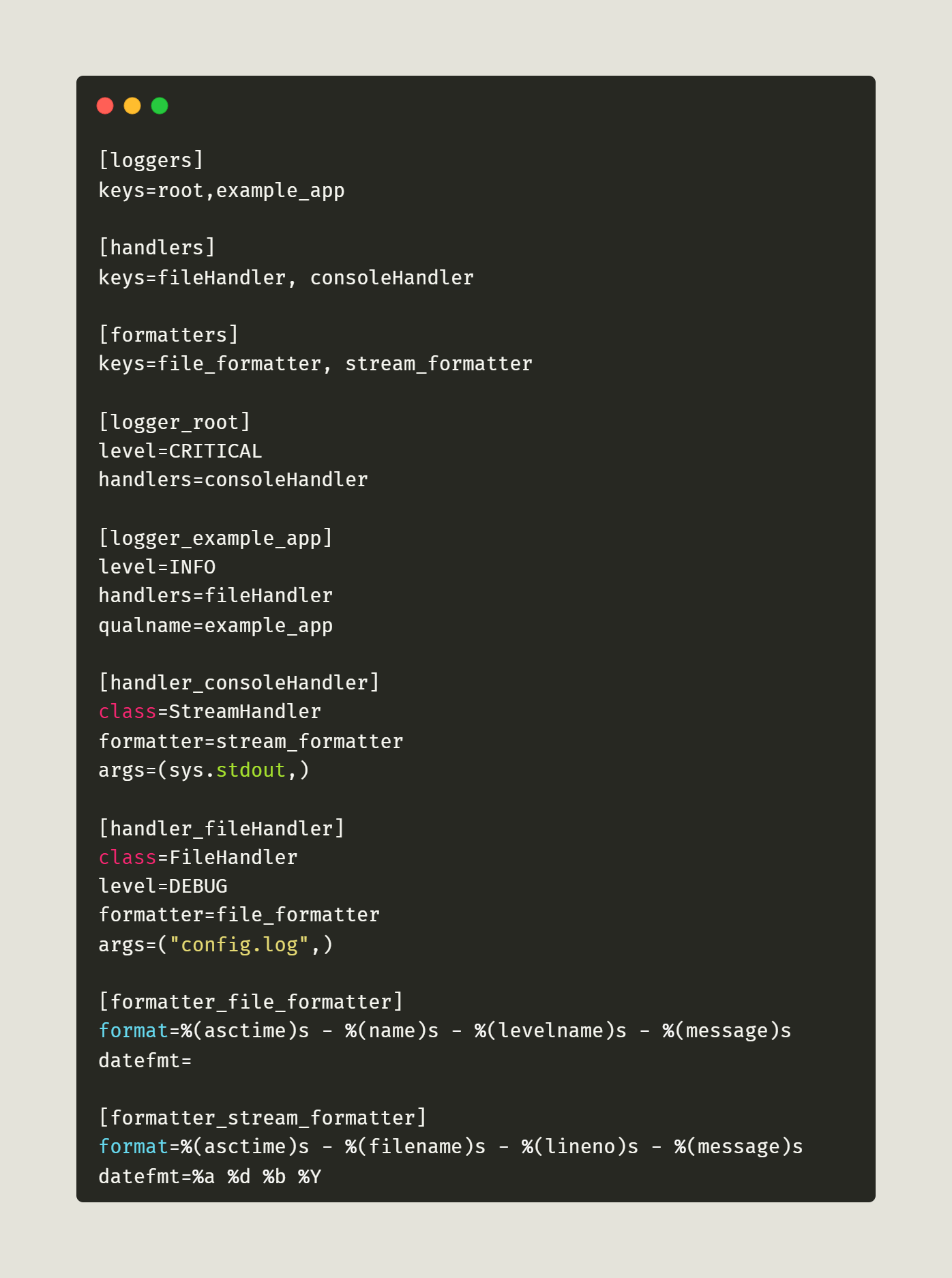
The rest of the configuration file is derived from the first three sections. So take a look at these first:
loggers
handlers
formatters
Each of these first three sections contains a list of comma-separated keys. These keys tell Python which logger, handler, and formatter objects are available.
The following sections are named using the section name, underscore, and key name. Here’s an example: logger_root
Note that it’s not named loggers_root (i.e. plural), but logger_root. When you set up your logger, tell it what logger level you want to use and which handler to emit log output to. In the case of logger_root, you set the level to CRITICAL and the handler to the console. The logger_root section is REQUIRED!
But what is a root logger, anyway? The root is the default or lowest-level logger, and it is required when using a configuration file. If you want to, you could use a NullHandler for your root to prevent it from outputting anything, at least temporarily.
The individual handler configuration sections (ex. handler_consoleHandler) allow you to set the following:
class - The type of handler to use
level - The log level you want to use
formatter- Which formatter to use
args - The arguments to pass to that formatter object
Note that the args value here is where you pass in the path to the log file to which you want to write in the case of your FileHandler object.
Finally, the formatter sections give you the ability to format the formatters, using values similar to the arguments you passed to the formatter class:
format - The Log Record formatting string
datefmt - The datetime formatting used to format datetime objects
In the example above, you configure two handlers: a FileHandler and a StreamHandler. You also configure two formatter objects, one for the FileHandler and the other for the StreamHandler. The formats and the date formats for each are slightly different too.
Now that you have finished the configuration, open your Python IDE back up and create a Python file named log_with_config.py. Then enter the following code in it:
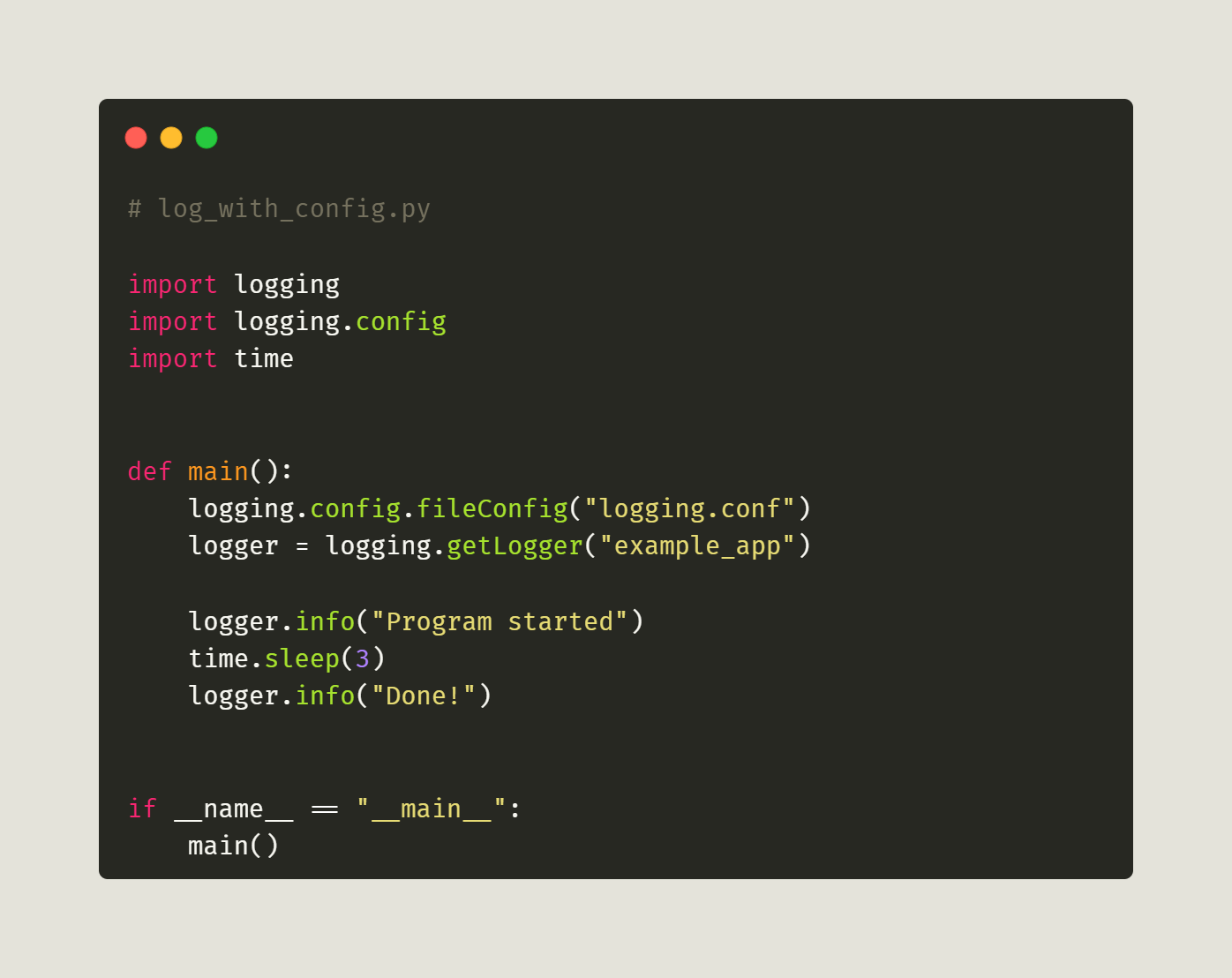
Your code is considerably smaller now that you use a file configuration for your logs. All that boilerplate is now abstracted away. You could do the same by making a custom module where you do all your logging setup using Python’s logging API, but using a configuration file is a nice alternative.
Loading a file-based logging configuration is via the logging.config submodule, which has a fileConfig() method. You then pass in the path to your logging config file to the fileConfig() method. This loads the configuration into memory, and you can then get the logger objects using logging.getLogger().
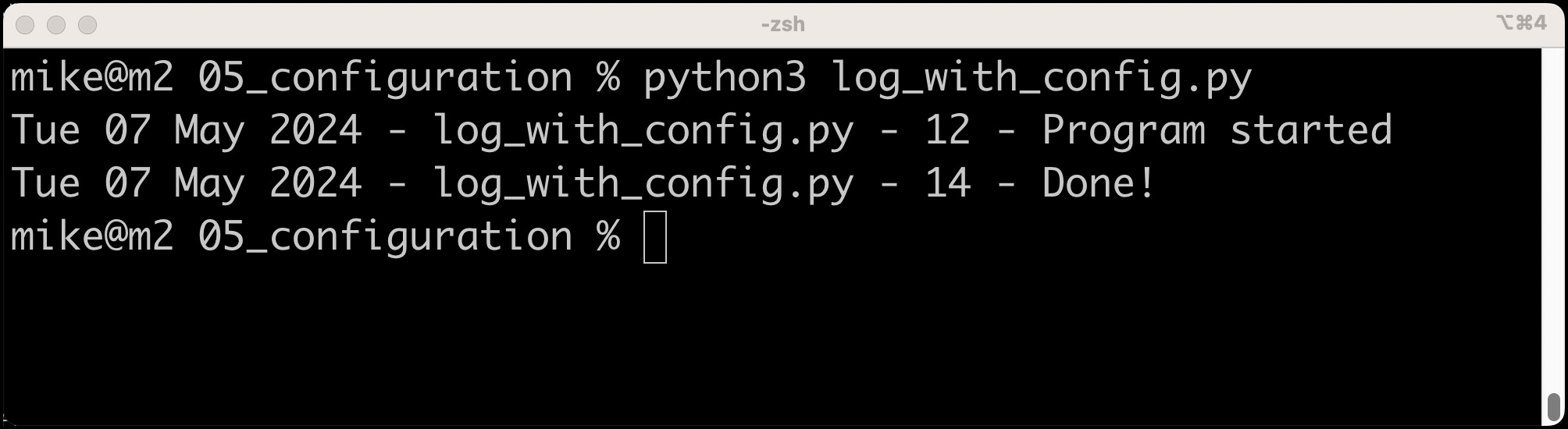
When you run this code, you will see something like the following printed to stdout (i.e. your console):
If you open up your copy of config.log, you will see something similar to the following inside of it:
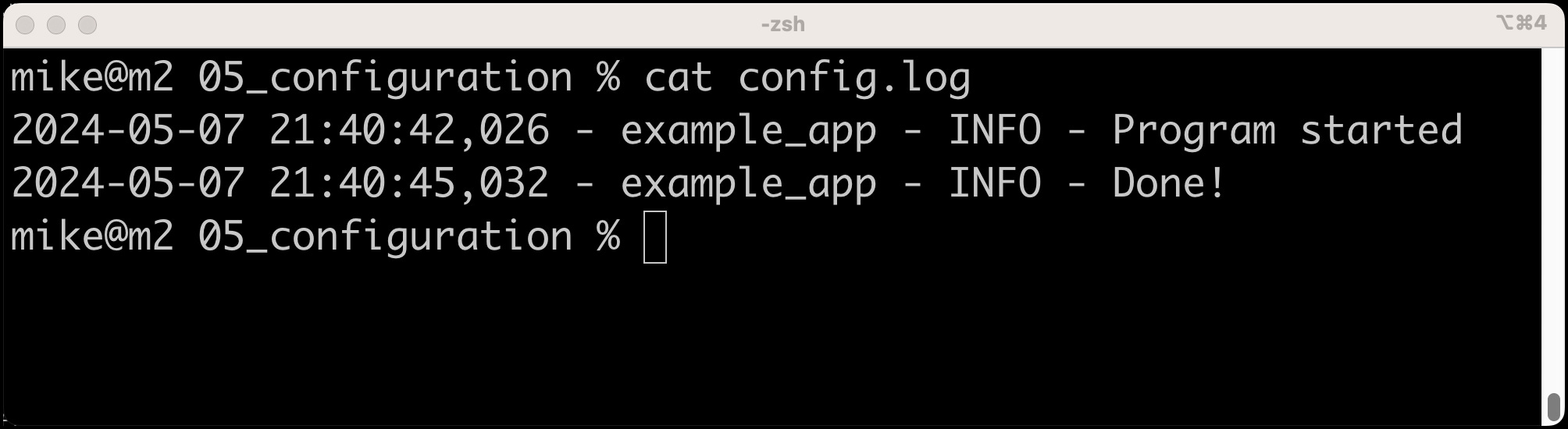
Take note that the datetime format is different in each of these. The console log uses a custom datetime format, while the file log uses the default datatime format. You are also logging out different log record attributes in each, except for the last part, the log message.
Start experimenting with your copy of the configuration file. Change it up. Add some new handlers or loggers. Then test it out and see how your logs change!
Now you’re ready to move on and learn about the last way to configure your logs.
Configuring Using dictConfig()
The final type of logging configuration you can apply is via the dictConfig() method, another method from the logging.config submodule you learned about in the previous section.
As the name implies, you will create a Python dictionary to hold your logging configuration rather than using a file or the logging API itself.
You can start by opening up your Python IDE or favorite text editor. Create a new file named log_with_dict_config.py and add the following code to it:
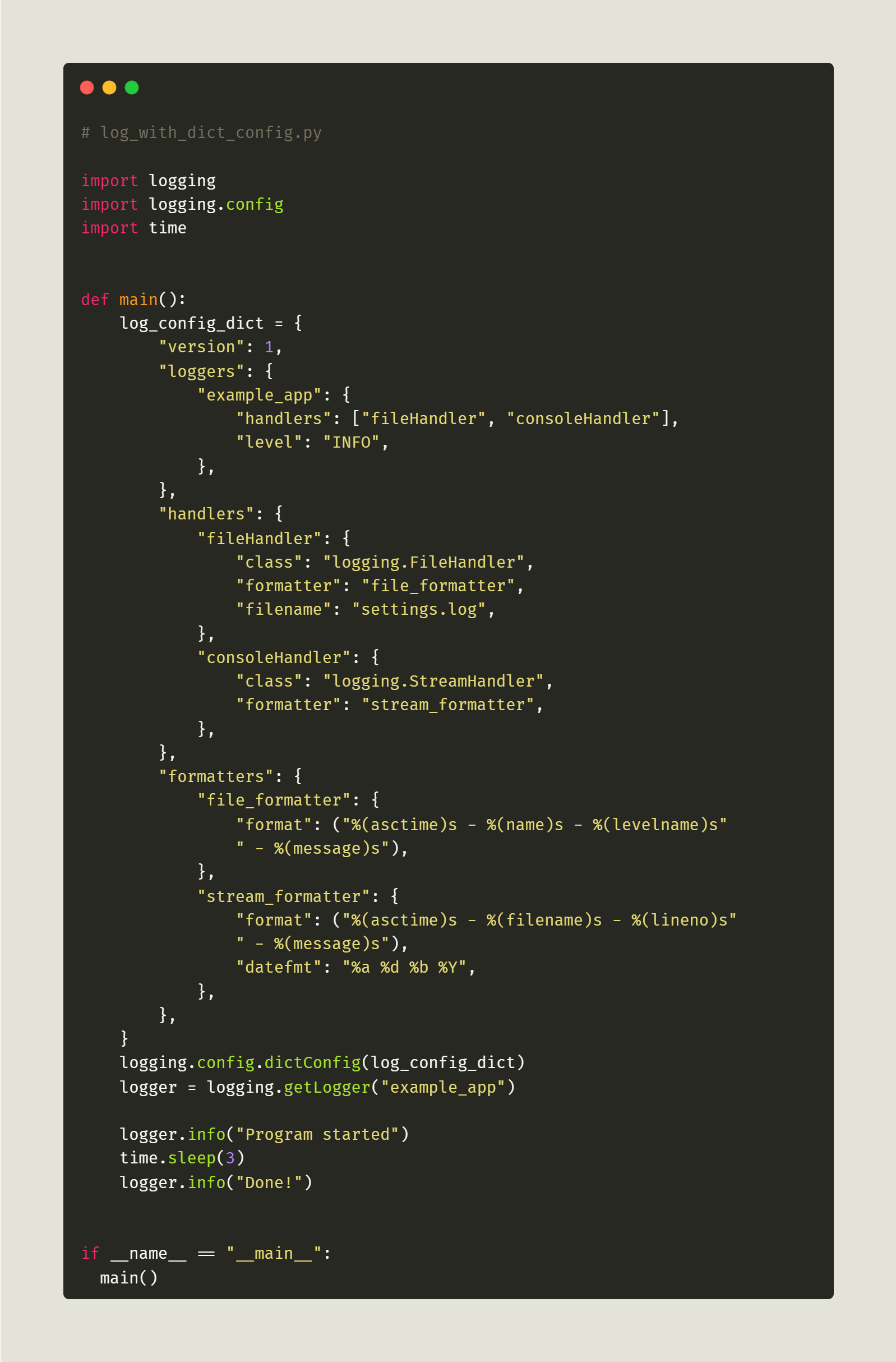
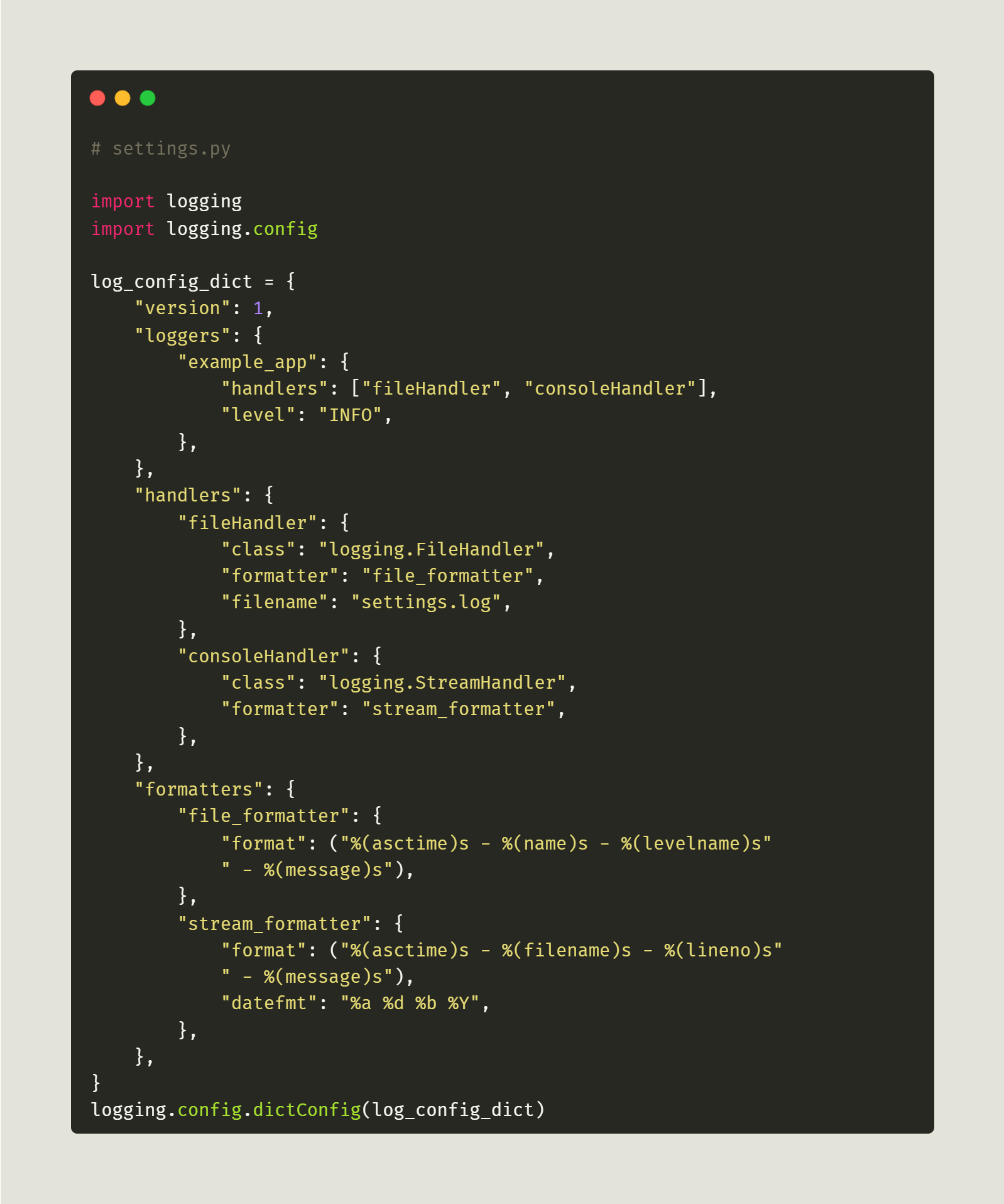
You must focus on the log_config_dict, which defines your log’s configuration. There are four top-level keys:
version - The version of your log dict
loggers - The logger objects
handlers - Which log handlers you want to use
formatters - The formatter objects to apply to your handlers
You don’t use the version explicitly in this example, but logger.config requires this key and will raise a ValueError if you don’t include it. The version must also be set to one or a ValueError will be raised.
Your loggers key specifies which logger objects you support. You do not need to specify a root logger when using a dictConfig. If you didn’t set up a loggers key though, you will not log anything, so be sure to set that up AND also call getLogger() to get your logger object.
The handlers key is where you specify which handlers you want to support for your logger. In this case, you recreate the FileHandler and the StreamHandler you had in your fileConfig. For the FileHandler, you have a nested dictionary where you can specify which formatter you want to apply and what file to save the logs to. Add a separate formatter for the StreamHandler to keep things interesting, as you did in the previous example.
The formatters key has a nested dictionary where you define one or more formatters. Create a format key and a Log Record formatted string to add a format. You may also add a datefmt key here where you can use the datetime formatting string to change how the timestamps are recorded in your logs.
To use the dictionary config, you must pass the dictionary object to logging.config.dictConfig(). Then, it would be best to use logging.getLogger() and pass it the logger name you created in your dictionary.
When you run this code, the output to the console and the file will be in the same formats as in the fileConfig section.
The dictConfig format is newer than the fileConfig format. Python’s documentation notes that future enhancements to the logging module’s configuration functionality will be added to dictConfig, so that is the recommended format if you want to use the latest logging features.
Best practice is to move the dictionary config to a file named settings.py or conf.py. Here is an example:
Then you could update your main code to the following:
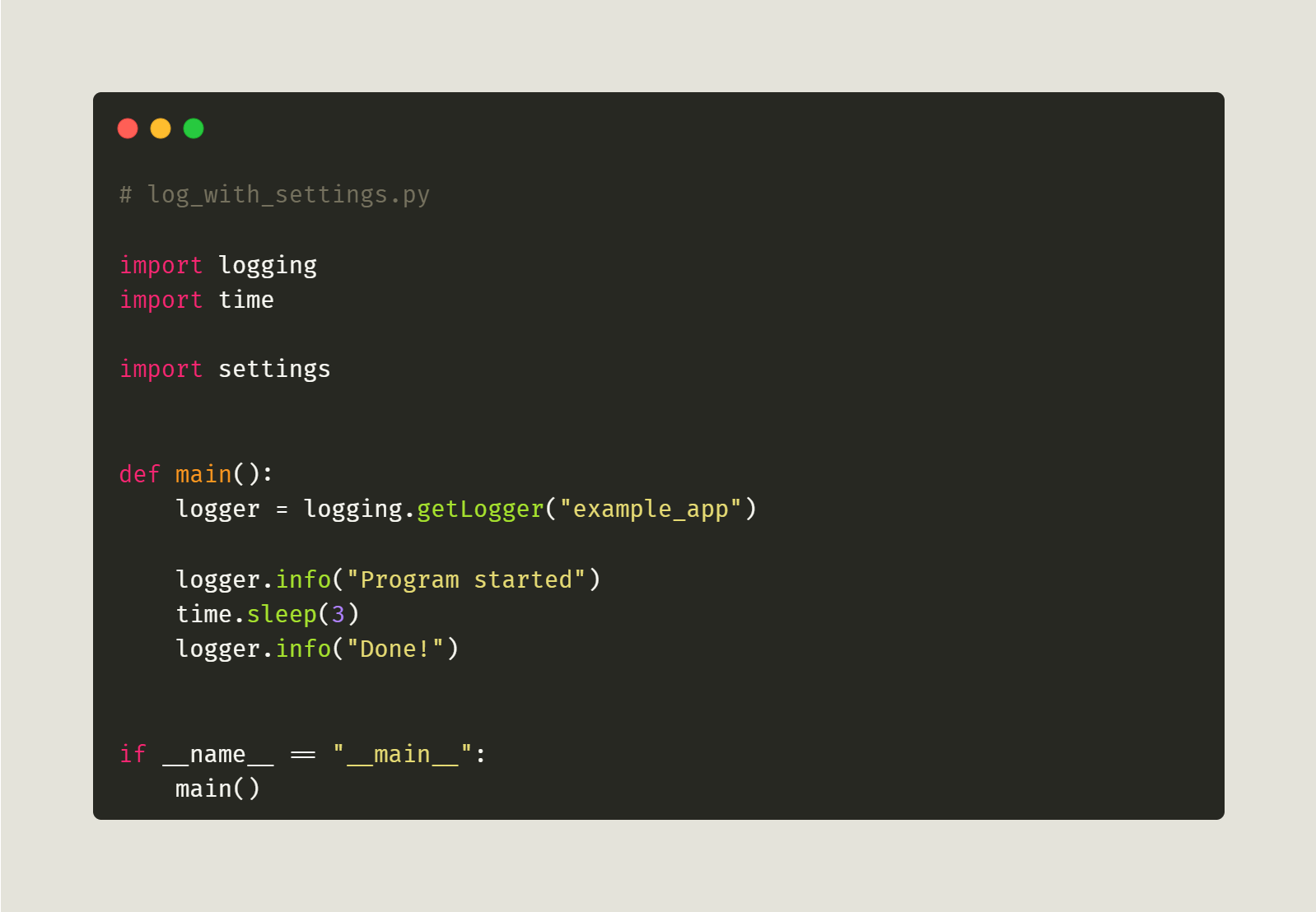
You can see that the main code is now much shorter. You configure the logger when you import settings, and you can access it using logging.getLogger("example_app"). From there, everything works the same way as before.
Wrapping Up
Python’s logging module provides flexibility in configuring your logs. You should be familiar with all three methods.
In this tutorial, you learned about the following methods:
Configuring using
loggingAPIConfiguring using
fileConfigConfiguring using
dictConfig
The logging module’s API is the most well-known. You will find many examples of that in tutorials all over the Internet. In many ways, the logging API is the most flexible. Many developers create custom logging modules and classes to get the most flexibility from their logs.
However, the logging API is not the only way to configure your Python application’s logs. You can also use fileConfig or dictConfig. If you choose between those two, you should use the dictConfig as it will receive the most support in the future. If you want to keep your code modular, you can place the dictionary in its own Python module and import it.
Start experimenting with these three different methods of configuring your logs and see which one you like best!